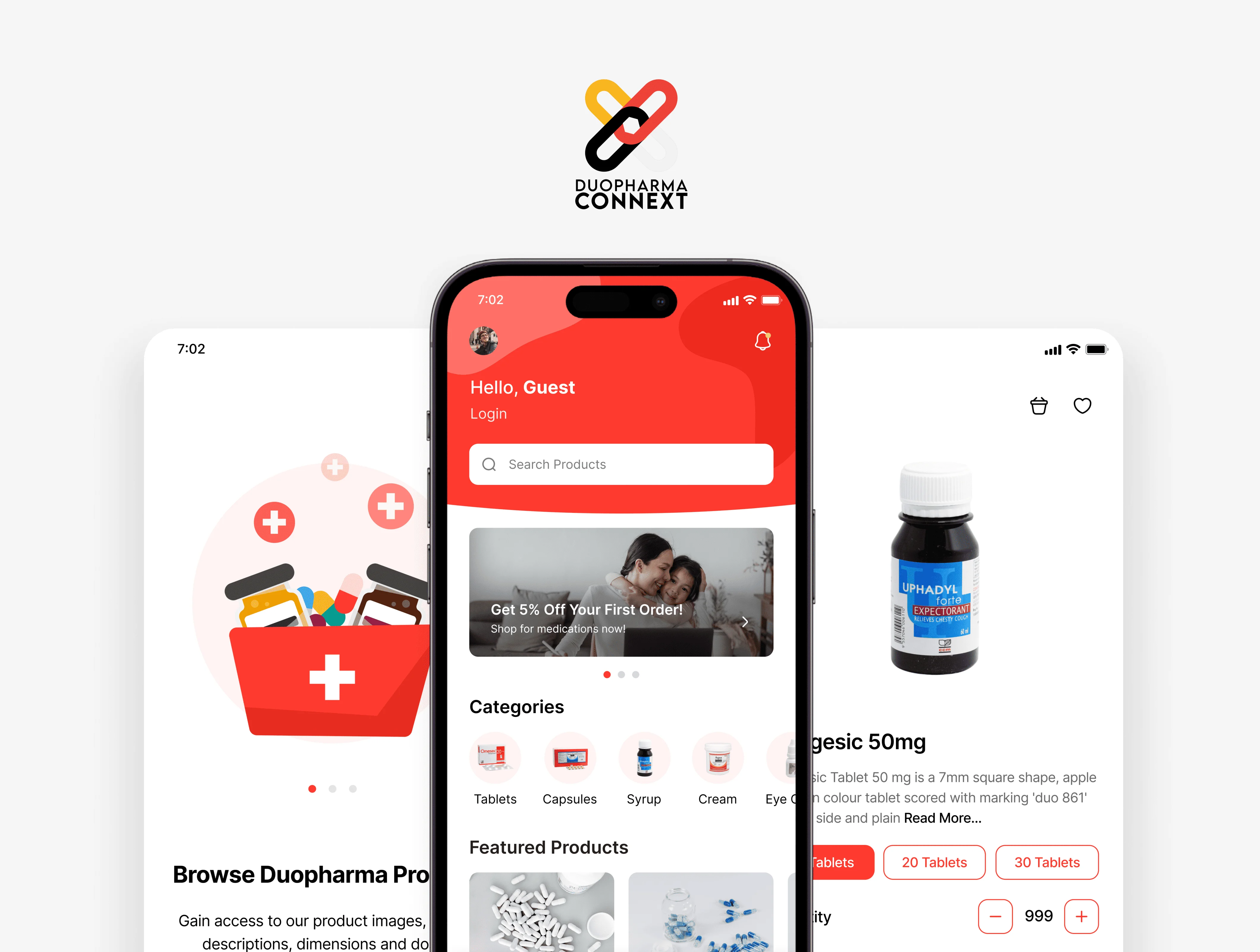
Duopharma Connext
Overview
Duopharma Connext began with a very real problem: pharmacies spend too much time and energy managing orders manually. Calls, emails, spreadsheets, it slows everything down. Duopharma wanted a mobile app that made ordering simple, structured, and efficient for their pharmacy partners.
I led the entire design process from the ground up.
Categories
App Design
Client
Duopharma
Understanding the Users
Before opening Figma, I spoke to people who worked in pharmacies. The ones who would actually use this app daily. What stood out was how fast-paced their environment is. They rarely sit down at a desk. They multitask constantly. And when they need to place an order or check stock, they want it fast, accurate, and predictable.
That shaped everything:
the app needed to feel straightforward, fast, and extremely easy to use.
Shaping the Experience
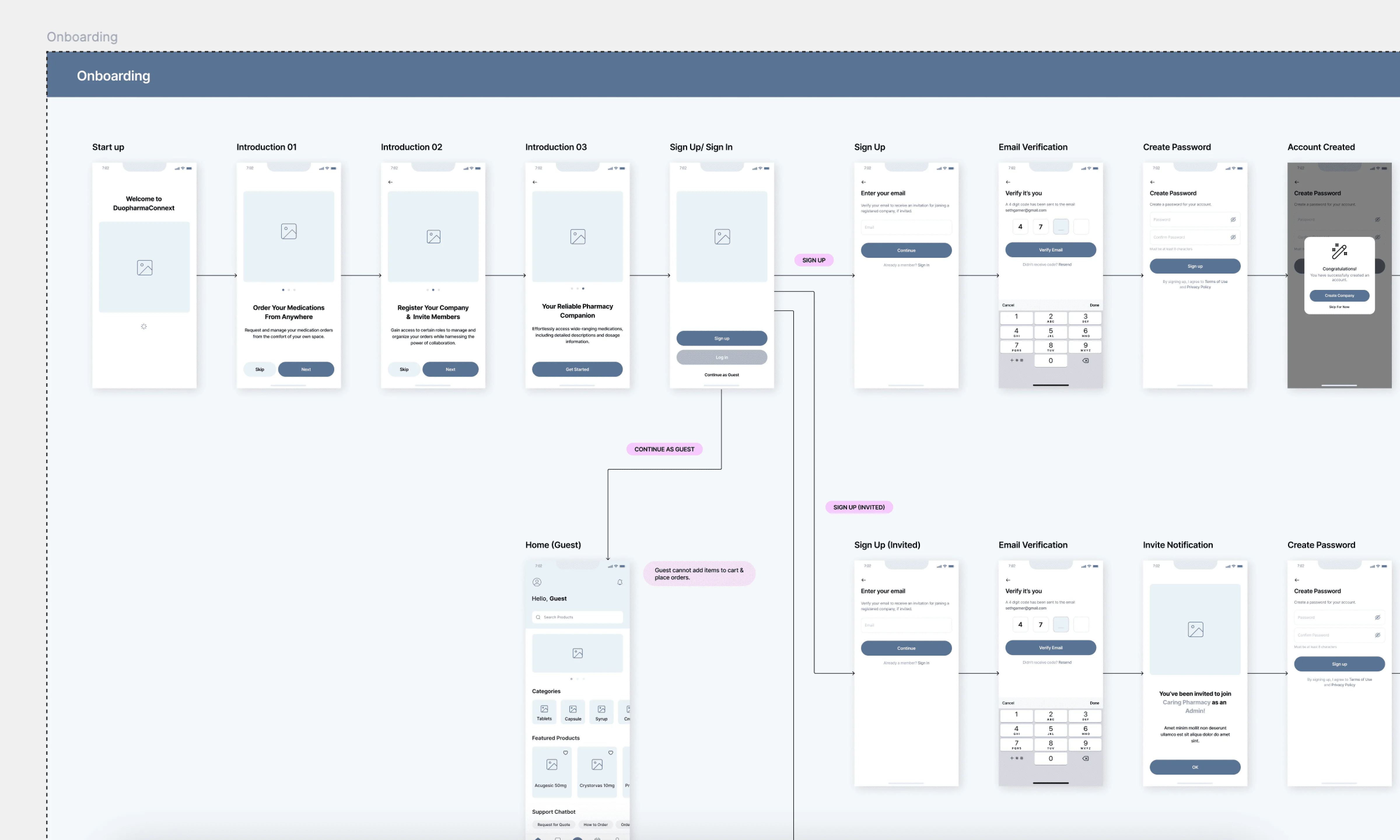
With the insights in place, I mapped out the entire flow of how pharmacists typically place orders:
Open the app
Find the product
Check details
Add quantity
Review
Place order
Track order
It sounds simple, but designing this flow required careful decisions about layout, hierarchy, and speed. Every tap needed to feel purposeful. Every screen had to reduce friction, not add to it.
From Wireframes to High-Fidelity
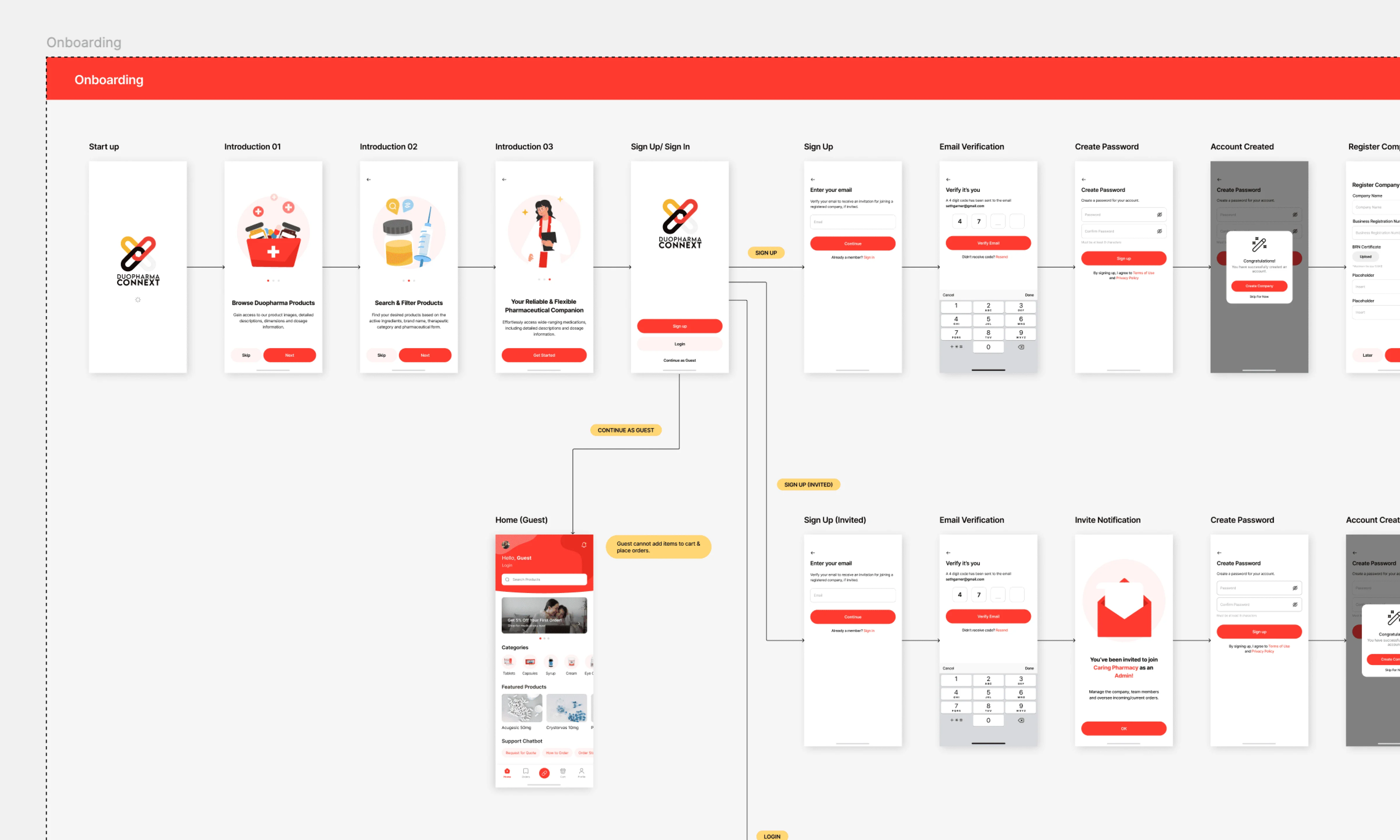
I started with low-fidelity wireframes to validate the structure quickly. These helped me test where elements should live, how navigation should feel, and how information should be layered for clarity.
Once the flow felt natural, I moved into the high-fidelity stage, where the app began to reflect Duopharma’s professionalism and credibility.
I used clean typography, balanced spacing, and a calm visual style that pharmacists could use comfortably throughout the day.
Designing the Core Screens
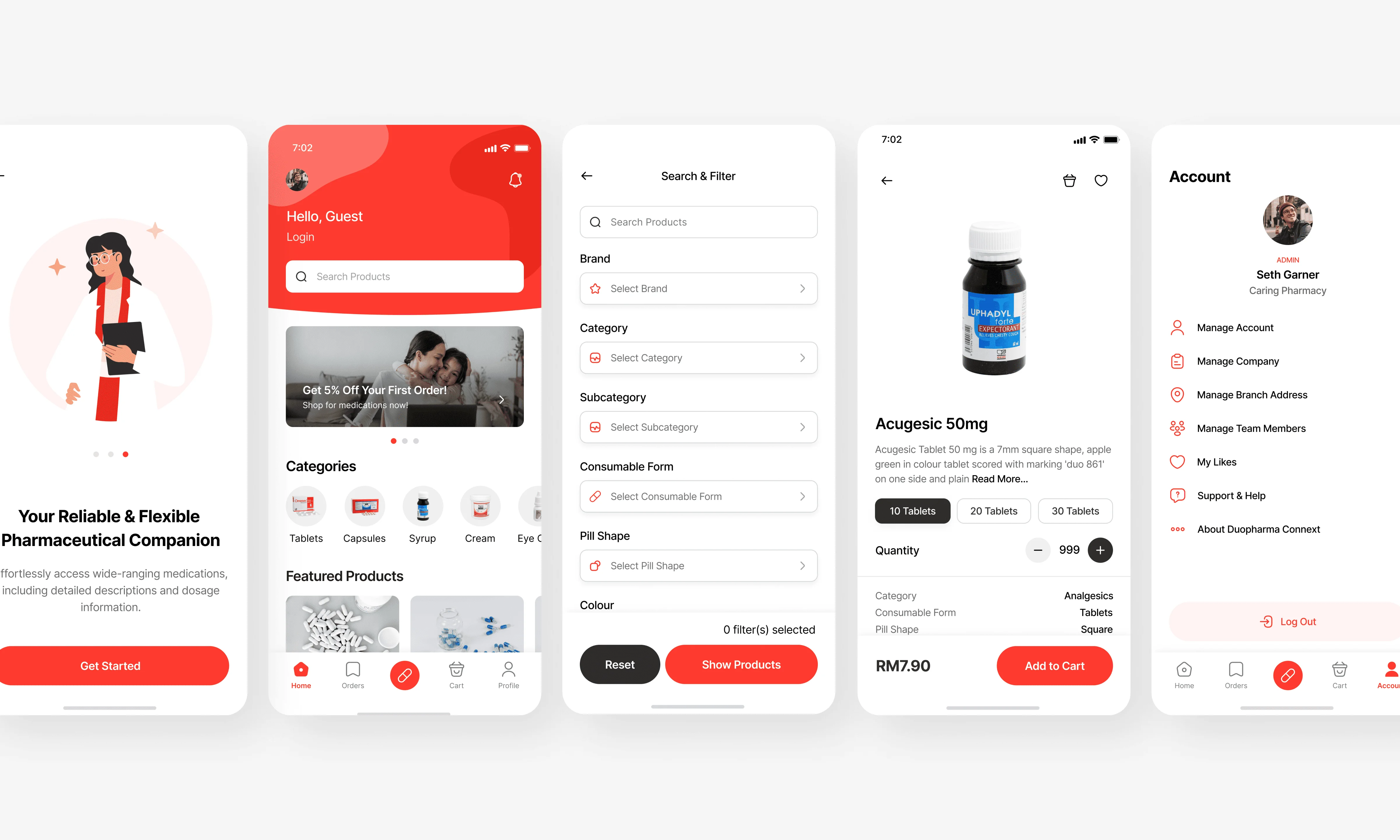
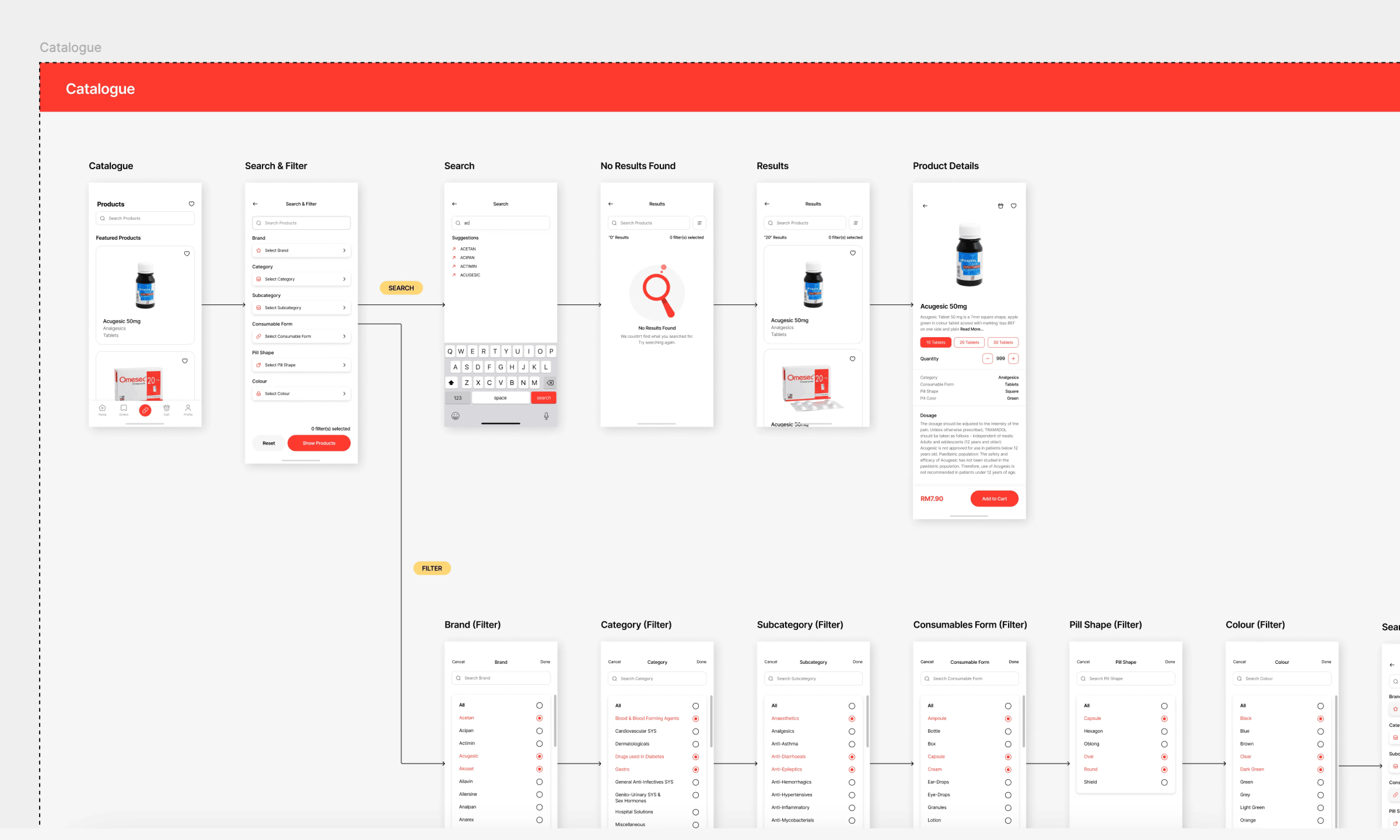
Each main section was designed to support the ordering experience:
Home as the central hub
Catalogue for browsing and searching
Orders for full visibility
Cart for fast bulk adjustments
Profile for account and support
Everything was intentionally simple. Nothing felt hidden or confusing. A pharmacist should be able to pick up the app and navigate it intuitively without training.
Bringing It All Together — Prototype & Handoff
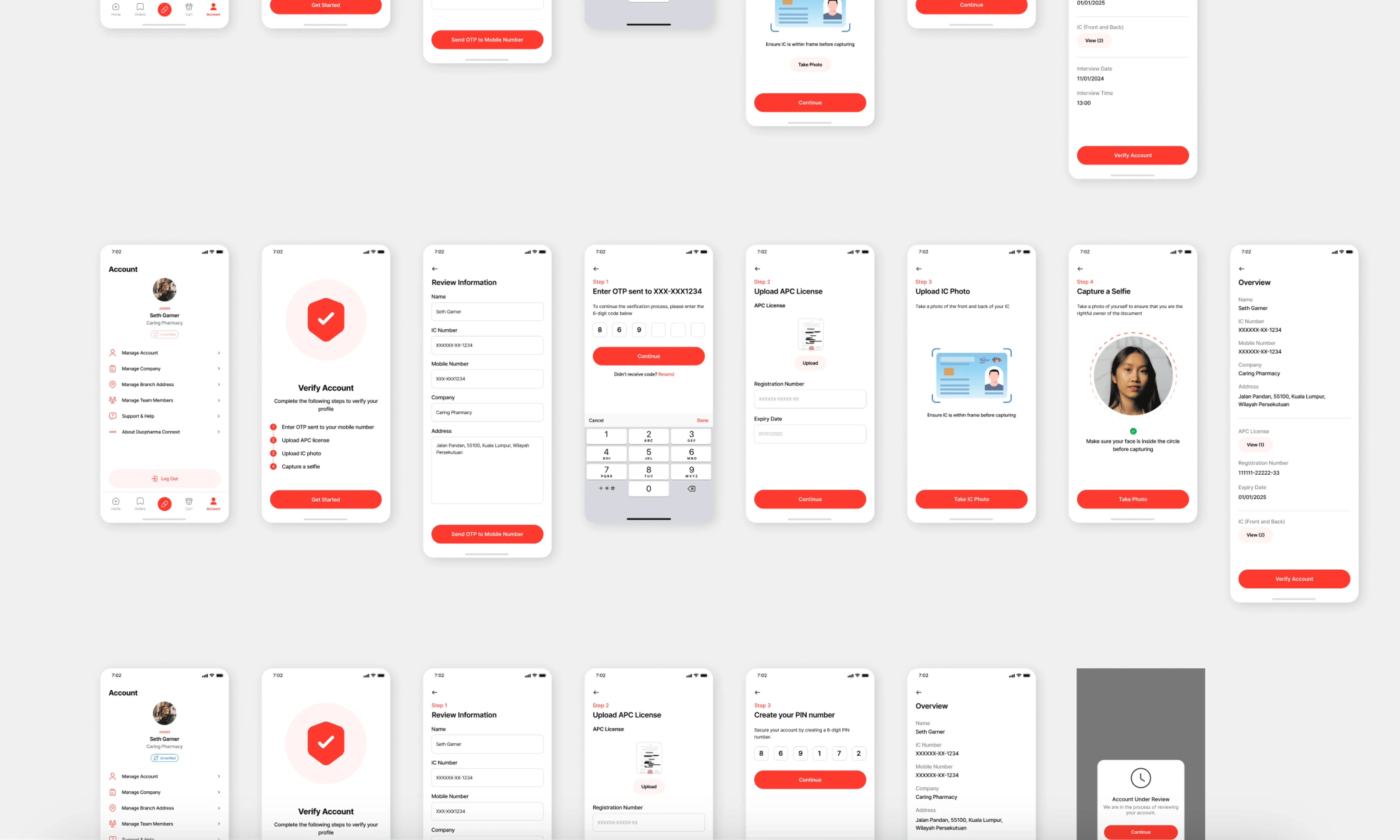
I created an interactive prototype that demonstrated the entire journey. This made it easier for Duopharma to test the flow internally before development started.
The handoff was fully structured:
organised Figma pages
components and style definitions
spacing and type rules
behaviour notes
edge cases and empty states
responsive variations
The goal was to eliminate guesswork and ensure development could begin smoothly.
Outcome
Duopharma Connext successfully transformed a slow, manual ordering process into a clean, reliable mobile experience. The app helps pharmacies save time, reduce errors, and manage their supplies confidently.
Duopharma Connext
Overview
Duopharma Connext began with a very real problem: pharmacies spend too much time and energy managing orders manually. Calls, emails, spreadsheets, it slows everything down. Duopharma wanted a mobile app that made ordering simple, structured, and efficient for their pharmacy partners.
I led the entire design process from the ground up.
Categories
App Design
Client
Duopharma
Understanding the Users
Before opening Figma, I spoke to people who worked in pharmacies. The ones who would actually use this app daily. What stood out was how fast-paced their environment is. They rarely sit down at a desk. They multitask constantly. And when they need to place an order or check stock, they want it fast, accurate, and predictable.
That shaped everything:
the app needed to feel straightforward, fast, and extremely easy to use.
Shaping the Experience
With the insights in place, I mapped out the entire flow of how pharmacists typically place orders:
Open the app
Find the product
Check details
Add quantity
Review
Place order
Track order
It sounds simple, but designing this flow required careful decisions about layout, hierarchy, and speed. Every tap needed to feel purposeful. Every screen had to reduce friction, not add to it.
From Wireframes to High-Fidelity
I started with low-fidelity wireframes to validate the structure quickly. These helped me test where elements should live, how navigation should feel, and how information should be layered for clarity.
Once the flow felt natural, I moved into the high-fidelity stage, where the app began to reflect Duopharma’s professionalism and credibility.
I used clean typography, balanced spacing, and a calm visual style that pharmacists could use comfortably throughout the day.
Designing the Core Screens
Each main section was designed to support the ordering experience:
Home as the central hub
Catalogue for browsing and searching
Orders for full visibility
Cart for fast bulk adjustments
Profile for account and support
Everything was intentionally simple. Nothing felt hidden or confusing. A pharmacist should be able to pick up the app and navigate it intuitively without training.
Bringing It All Together — Prototype & Handoff
I created an interactive prototype that demonstrated the entire journey. This made it easier for Duopharma to test the flow internally before development started.
The handoff was fully structured:
organised Figma pages
components and style definitions
spacing and type rules
behaviour notes
edge cases and empty states
responsive variations
The goal was to eliminate guesswork and ensure development could begin smoothly.
Outcome
Duopharma Connext successfully transformed a slow, manual ordering process into a clean, reliable mobile experience. The app helps pharmacies save time, reduce errors, and manage their supplies confidently.
Duopharma Connext
Overview
Duopharma Connext began with a very real problem: pharmacies spend too much time and energy managing orders manually. Calls, emails, spreadsheets, it slows everything down. Duopharma wanted a mobile app that made ordering simple, structured, and efficient for their pharmacy partners.
I led the entire design process from the ground up.
Categories
App Design
Client
Duopharma
Understanding the Users
Before opening Figma, I spoke to people who worked in pharmacies. The ones who would actually use this app daily. What stood out was how fast-paced their environment is. They rarely sit down at a desk. They multitask constantly. And when they need to place an order or check stock, they want it fast, accurate, and predictable.
That shaped everything:
the app needed to feel straightforward, fast, and extremely easy to use.
Shaping the Experience
With the insights in place, I mapped out the entire flow of how pharmacists typically place orders:
Open the app
Find the product
Check details
Add quantity
Review
Place order
Track order
It sounds simple, but designing this flow required careful decisions about layout, hierarchy, and speed. Every tap needed to feel purposeful. Every screen had to reduce friction, not add to it.
From Wireframes to High-Fidelity
I started with low-fidelity wireframes to validate the structure quickly. These helped me test where elements should live, how navigation should feel, and how information should be layered for clarity.
Once the flow felt natural, I moved into the high-fidelity stage, where the app began to reflect Duopharma’s professionalism and credibility.
I used clean typography, balanced spacing, and a calm visual style that pharmacists could use comfortably throughout the day.
Designing the Core Screens
Each main section was designed to support the ordering experience:
Home as the central hub
Catalogue for browsing and searching
Orders for full visibility
Cart for fast bulk adjustments
Profile for account and support
Everything was intentionally simple. Nothing felt hidden or confusing. A pharmacist should be able to pick up the app and navigate it intuitively without training.
Bringing It All Together — Prototype & Handoff
I created an interactive prototype that demonstrated the entire journey. This made it easier for Duopharma to test the flow internally before development started.
The handoff was fully structured:
organised Figma pages
components and style definitions
spacing and type rules
behaviour notes
edge cases and empty states
responsive variations
The goal was to eliminate guesswork and ensure development could begin smoothly.
Outcome
Duopharma Connext successfully transformed a slow, manual ordering process into a clean, reliable mobile experience. The app helps pharmacies save time, reduce errors, and manage their supplies confidently.


Let's Connect
© 2025 All right reserved
Created by Farris Rauf
Let's Connect
© 2025 All right reserved
Created by Farris Rauf
Let's Connect
© 2025 All right reserved
Created by Farris Rauf